BONUS – Quick Start Guide
How To Sign Up For ChatGPT
If you haven’t already created your free account with ChatGPT, here’s how to do it.
1. Go to the ChatGPT website: https://chat.openai.com
Sometimes the site can be temporarily down due to overwhelming demand. I’ve found that simply refreshing the page fixes this, although in some cases you may need to try again in a few hours.
They’ve also released a $20/m option which gives greater stability and early access to new updates. The free version works just fine, however, if you find yourself using ChatGPT a LOT each day then I’d recommend upgrading for at least a month to see the difference.
2. Click on the “Sign Up” button
3. Fill in your details
And that’s it! You’re now ready to start using ChatGPT.
How To Use ChatGPT
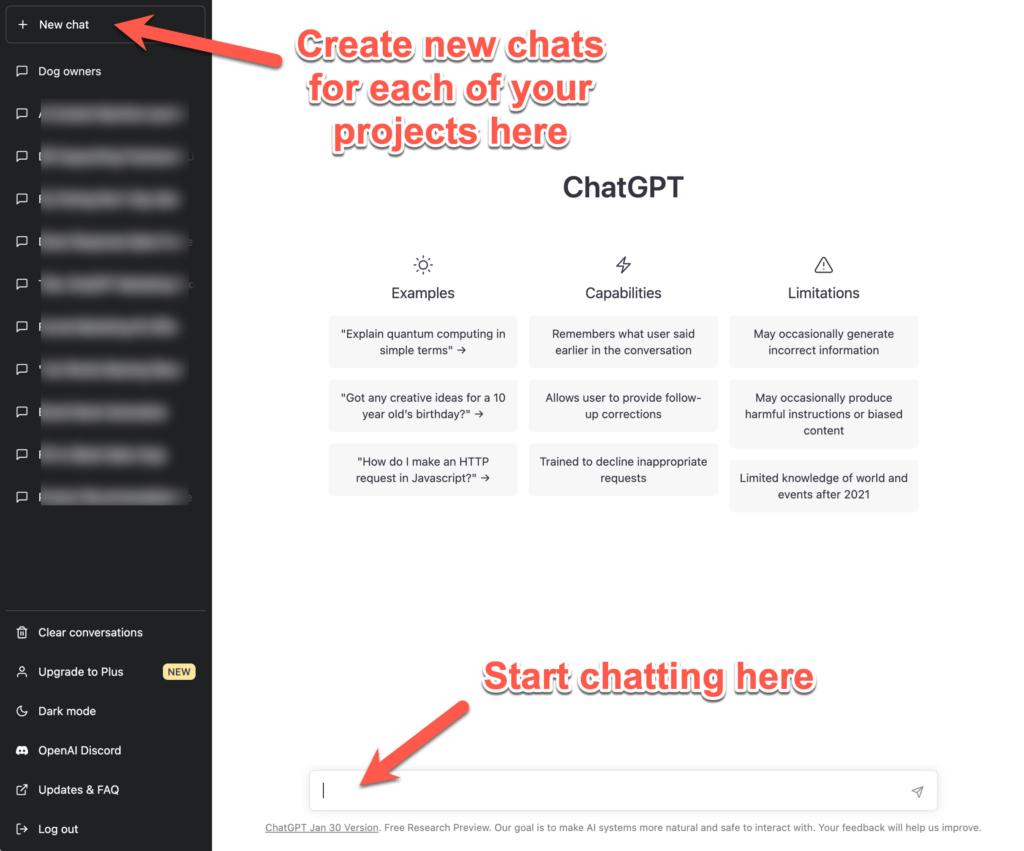
Once you’ve logged in to ChatGPT, you’ll see the ChatGPT user interface. On the left-hand side of the screen, you’ll see a list of your chats.
To start a new chat, simply click on the “+ New Chat” button at the top of the list of chats.
Each new chat will have its own “AI memory”, so you can train ChatGPT for different tasks and projects. As a result, I like to keep different chats for each niche or project I’m working on.
And on the right-hand side of the screen, you’ll see the chat window. This is where you’ll input your prompts and see the AI’s response.
When you’re ready to start a new chat, simply type in a prompt and hit enter. You can then continue the conversation with more prompts and information about what you want.
The more you talk to ChatGPT, the more it will understand what you’re looking for, and the more accurate its response will be.
So, have fun with it, and let your imagination run wild!
What Are 'Prompts' and How Do You Use Them?
Using ChatGPT is simple.
All you need to do is provide ‘prompts’ or instructions inside the Chat Box that guide ChatGPT to create the type of content you want.
Think of it like a conversation with a real person. The more information you give, and the more follow-up questions you ask… the better the response you’ll get.
So by providing additional prompts and feedback to the content it creates, you can then guide ChatGPT to refine the content to where you want it to be.
Best of all, as you continue to refine and train the AI over time, you’ll find it becomes increasingly better at spitting out the exact type of content that you need.
Creating Your Content In 3 Easy Steps…
STEP 1: Seed ChatGPT With Your Business Information…
Enter the prompt below to let ChatGPT know all about your product/service and target market. (You can find variations of this seeding prompt inside each of the prompt categories.)
"I would like your help to create direct response style marketing content for my [service/product].
But before we start creating this content together, first I’m going to give you a detailed overview of my [service/product]. This is so you can better understand how my [service/product] works, what problems it solves, and how it will help my marketing avatar.
1. My [service/product] is called [enter it here]
2. My [service/product] is designed to help [your target audience] [achieve X/eliminate Y]
3. The main benefit of my [service/product] is [enter it here]
4. The main problem my [service/product] solves for my marketing avatar is [enter it here]
5. The main pain point my marketing avatar is experiencing is [enter it here]
6. The main thing that separates my [service/product] apart from similar [services/products] in the market is [enter it here]
7. Some of the main features of my [service/product] are [enter it here]
For now, I don't want you to create the marketing content. I just want you to understand what my product is. If you understand, just reply with I understand.”
STEP 2: Once you’ve seeded your chat with the above information, continue by entering the specific prompt you want to run.
For example, below is one of the email creation prompts…
"Write an email that uses the BAB (Before-After-Bridge) framework to communicate the transformational value of my product or service and encourage subscribers to take action for [insert information about my business or industry]."
STEP 3: Refine Your Content.
In some cases, you may need to provide additional prompts to refine your content.
For example, you can ask ChatGPT to rewrite the content to give you a different version, to make it shorter/longer, or to rewrite it in a different tone (eg “Rewrite the above so that it appeals more to women aged 40-50 years old).
The possibilities are limited only by your imagination, so experiment with your prompts and imply adjust the results until it’s what you need.
Problem-Solving And Improving ChatGPT’s Content
Since ChatGPT is growing at an exponential rate, it’s only natural that there are a few bugs here and there… and occasionally the content it produces (like any writer!) isn’t exactly what you wanted.
So, whenever that happens, here are a few tricks to get things back on track
1) Refresh the page. This can often fix any temporary bugs you might be facing.
2) Tell ChatGPT it got the content wrong. I use this one all the time if I’m not happy with the output. eg…

3) Tell ChatGPT to forget your last prompt so you can start again. eg…

4) Simply hit the Regenerate response button. This is also great if you want more versions of the content to use for split testing or building up your swipe file of useful content pieces. Make sure to copy and paste the output first though as ChatGPT will write over the top of its last version. eg…


© 2024 ILKERBEYBIZ.COM . ALL RIGHTS RESERVED.